Showing posts with label software. Show all posts

2023-12-31

MDOS

 A blast from the past....

I came across some old archived files from April 1992 which included a copy of my program for controlling trains with a Märklin 6050 interface. The program was started in 1988 and demonstrated publicly in 1989 at the University of Natal Winterfest.


The executable file is just 43K in size!

Here is the description file:

In my spare time I over the last five years, I have been working on a Turbo Pascal program for the Märklin digital system.

I have used earlier versions to demonstrate the Marklin digital system at the ComputerFest held at the University of Natal in Durban, South Africa in 1989 and also at a modelling exhibition in Durban in 1990.

I have uploaded the file MDOS.ZIP containing my program in its present form as well as MDOS.DOC which is a brief description in ASCII format. MDOS.DOC is also contained in the MDOS.ZIP file.

System requirements are minimal. No graphics card is required. Colour is nice but not required. An 8088 is adequate.

Future plans include complete automatic control, full crane and turntable support, digital sound output, graphics layout diagrams that can be built up from tiles, wagon lists that enable automatic train lengths and speed limits etc. Given sufficient incentive, I may contemplate other digital systems as well.

Although I live in Germany my mother tongue is English but I invite comments in either German or English.

D M Schultz

Here is the content of the MDOS.DOC file:

Brief description of MDOS (Maerklin Digital Operating System)

The program is a test version only and is NOT FINISHED. I invite feedback and suggestions as to possible methods of distribution. Shareware ?

MDOS is a control program for the Maerklin Digital Interface. The following can be controlled independently:

     80 locomotive addresses

     256 electro-magnetic devices

     496 switches can be monitored.

It should run on any PC compatible machine and is written in Turbo Pascal 5.

The program detects the type of display adaptor and sets its colours accordingly. The colours are fixed at present.

Locomotives run at SCALE speeds. E.g. 120 km/h not 'level 9'

Any number of the locomotives an be linked together allowing multiple heading. A circular linkage is not possible.

Each locomotive accelerates properly according to its power, mass of the train and in addition the acceleration will not exceed that which would be possible given its axle loading and number of axles applying tractive force. i.e. maximum tractive effort, before wheel slippage occurs. Train mass is divided evenly between all locos pulling that train.

Forward and reverse speed limits can be set for each loco.

At present the layout diagram is very rudimentary and is made from ASCII files. The layout diagram can be scrolled. Up to 10 magnetic devices can be allocated to any key. Eg. key G can set 10 of the 256 possible devices.

Redundant command are not sent. The program hooks for automatic travel have been built into the program but are not yet implemented.

During normal use of the program, the program is never in a wait state. i.e. all accelerations are being monitored and the respective commands are being sent out.

The interval between the reading of all switches via s88 modules can be specified.

Any s88 module can be tested. A schematic view of an s88 module is presented and can be read, decoded and displayed at 28Hz on a 386/25.

The setting of every locomotive can be resent at a specific time interval or on demand by pressing f9. This is useful if a loco did not receive a command due to a bad contact or was not on the rails at the time.

At program start up, all locomotive addresses are set to stop.

The special function if the 6080 decoder can be switched on and off independently of loco speed.

Additional functions have been temporarily programmed as follows:

   function 1     key f5
   function 2     key f2
   all off        key f6
   function 1 & 2 key f7

this is for the testing of a digital crane. f7 thus allows the boom to be raised and swung simultaneously.

At present, a loco cannot be deleted from a file.

Decoder DIP switch settings are shown when you set the decoder address.

USING MDOS

MDOS looks for a configuration file called MaeRKLIN.CFG. If this file is not in the current directory, you will be prompted for configuration information.

Once the program is running you are presented with one or more odometer scales.

f1 gives help on the key commands available. ESC pauses the system and pops up a menu that will allow you to alter the configuration, loco information, test an s88 decoder, alter points settings etc. If you have more than five locos defined, use PgUp & PgDn to move through screens of five locos at a time.

IMPORTANT

If you do not have a Maerklin Digital Interface connected, set the Serial port to Zero (0). This will allow the program to run but all commands will be sent to the NUL device. You cannot test an s88 module if the port is set to zero. You also cannot specify the number of s88 modules that you have unless you have a valid port number.

If the .LAY file cannot be found, MDOS will create one from the. .ASC file which must be an ASCII file. If you want to change the  .LAY file, edit the .ASC file and delete (or rename) the .LAY file.

Locomotives can be chained together by specifying the loco number (not the decoder address) of the next loco to be controlled, in the loco configuration screen. Eg if loco 1 is linked to loco 3, all commands issued for loco 1 will be repeated for loco 3.

For correct Double-heading, the locos should be correctly calibrated.

Automatic calibration can be carried out by selecting B from the 'Change loco info' menu option. This ensures that correct scale speeds are achieved. Calibration is carried out by sending the loco in question up and down past two track switches having a known distance from each other and measuring the time delay between the two switches. This is then converted to the correct scale speed and is saved to disk along with the rest of the information for the loco. For automatic calibration one naturally needs an s88 encoder. Calibration speeds can also be entered manually via the loco configuration screen.

The file MDOSDEMO.LOK defines 8 locos of varying type, mass and power.

Locos 6, 7, 8 & 3 are linked. When controlling linked locos, the maximum speed for the set will be the speed limit of the slowest.

You will notice that the acceleration for the different locos will be in accordance with their axle weight and mass of the entire train.

If you find the start up screen too time consuming, press any key.

This version of MDOS allows the selection of either English or German (in the configuration menu). All keystrokes are however still language independent.

DISCLAIMER

D M Schultz does not accept ANY responsibility for incorrect operation of the MDOS files or any equipment damage that may arise from using the program.

D M Schultz


If you have an old PC that runs DOS, you can download the program.

2023-12-11

How the Märklin turntable (7286) works and how to control it digitally

I needed to understand the internal working of my turntable so that I could optimize its digital operation. I have documented what I found below.

The Märklin turntable (7286) is a rebadged Fleischmann product and adapted for 3-rail running. It is a very nice prototypical looking turntable and has 48 possible track positions at 7.5° intervals.


It can be controlled manually on an analog layout and digital control is also possible, but not out of the box. (More on that later.)

Both ends of the turntable bridge have contacts that make connections with tracks around the edge. This allows transfer of power from the turntable to spoke tracks, ideal for analog layouts, but it can cause a problem with digital layouts due to contacts shorting to the always powered tracks as it turns.

To remove the bridge, unscrew the screw between the rails in the middle. Lift up the screw and a contact clip and the two metal plates that make up the center rail.

Two edge slots, three slots apart, have to be removed from around the perimeter in order to lift the small end of the bridge out. 

The bridge sits atop a set of six concentric contact rings. Below the turntable they are connected via a ribbon cable to a small interface board. Some of the connections are bridged with capacitors on the underside.

The contacts are as follows:

Contact ring

Label on

Interface

board

Function

1 (center)

B

Center rail of bridge

2

2

Motor - positive for clockwise movement

3

3

Motor - negative for clockwise movement

4

1

Relay - negative to turn it on

5

0 (near 1)

Rail adjacent to shed

6 (outer ring)

0 (near end)

Rail opposite the shed


On the underside of the bridge is a motor mechanism. The entire mechanism can slide a short distance along the length of the bridge. This allows a driving gear at the outer end of the motor mechanism to engage with, or be disengaged from, the teeth around the side of the turntable pit. A small hand lever can be pushed towards the center of the turntable to disengage the mechanism, allowing the turntable to be freely repositioned. A small spring reengages the motor mechanism when released.


The motor mechanism has a relay which is connected in such a way that when the relay is energized, it will close a switch in the motor circuit. In addition, the relay is mechanically connected to the main drive gear so that the switch is held closed except at 4 positions of the main drive gear, 90° apart. Thus, the motor circuit switch is closed and operable, if either the relay is energized or the drive gear is not at one of its 90° positions. 90° of rotation of the drive gear corresponds to 7.5° of rotation of the turntable bridge. There is also a third way the motor circuit switch can be closed, the hand lever that disengages the motor mechanism can also be pushed towards the outer edge of the turntable.


Rotation of the turntable bridge is achieved by energizing the relay and applying a voltage to the motor. To stop at the next turntable position, the coil is de-energized. The bridge continues to turn while the mechanical latch holds the switch closed. When the drive gear reaches one of its 90° positions, the latch is pushed into a notch on it by a spring, which opens the switch in the motor circuit, stopping the turntable. It is locked in place until the coil is energized and voltage applied to the motor.


To stop at a specific track beyond the track adjacent to the starting track, the coil must remain energized until it is within the last 90° of rotation of the drive gear. There is no feedback mechanism to know the speed of the motor so control systems using this setup have to rely on a time delay before de-energizing the relay.


Negative voltage on coil (4) will engage the relay if either motor line (2/3) is positive.


If the motor switch is closed, a positive voltage on 2 (and negative on 3) will drive the turntable clockwise and a positive voltage on 3 (and negative on 2) will drive the turntable counterclockwise.


The wiring schematic in my turntable is as follows:

Note that there are numerous versions of the turntable sold through various companies, and the wire colors and connection labels vary. The principle of operation is however, the same.


Inputs to control the turntable

Electrical input is direct current (12 - 16 Volts DC). If you want to use readily available 16VAC you should convert it to DC using a bridge rectifier (there is one you can use in the manual controller that comes with the turntable).


Controlling the turntable using a K84 type module.

One can use 3 addresses (A, B & C below) of a k84 module to control the turntable. Here is an example:


Connections

Turn clockwise

Port/ring

Voltage

K84s

3/3

Negative

A Green

2/2

Positive

B Green

1/4

Negative

C Green

Set port 1/contact 4 to positive (K84 C = Red) to stop at the next position

Turn counterclockwise

Port/ring

Voltage

K84s

3/3

Positive

A Red

2/2

Negative

B Red

1/4

Negative

C Red

Set port 1/contact 4 to negative (K84 C = Green) to stop at the next position


Immediate halt

Port/ring

Voltage

K84s

3/3

Positive

A Red

2/2

Positive

B Green

1/4

Positive

C Red


Multiple position movements

In order to move a specific number of positions (for example 24 positions to move 180°) automatically you will need to time how long your turntable takes to move one position, and multiply that by the number of positions you want to remove, and subtract one half period, to determine when to set port 3/contact 4 to negative. For example, say it takes 2s per position, to move 5 positions you wait for 2s x 5 - 2s/2 = 9s.


Note that turntable speed can vary with temperature and even direction of movement.


Order of k84 commands

If the K84 commands are sent in the order C, then A, then B, no unexpected movements will take place. Note however that with an Intellibox at least, there is no absolute guarantee in the order in which K84 commands are carried out.  This is because if the Intellibox turnout buffer happens to fill up, some commands are not accepted and the software has to resubmit them, and that may result in them being executed out of order. Other systems may be similar.

Other control methods

A number of third party companies have produced control systems. The most sophisticated I have read about is from the DSD2010 Digital-Bahn but you do have to modify the mechanism extensively. It also provides lighting for the control room and outputs for signals, and an option for a sound module.


Märklin used to sell a digital controller (item 7687) but early versions were very unreliable, and a number of people have opted for the k84 approach instead.


To get reliable turning to any specific track position, there has to be feedback from the turntable as relying on timings is fraught with sources of error. One approach I am considering is placing 48 reed contacts, connected to a single sensor, in a ring on the underside of the turntable and mounting a single magnet under the bridge. As the bridge moves, successive reed contacts will be closed and software can count the slots traversed and know how far the bridge has turned.


Bw


In my layout control software I can define turntables as follows:


And then it looks like this when running:

Red on a track indicates that it is occupied.


I can optionally display radio buttons to select any track directly, or even any slot that is 180° away from any track.


If the turntable is not motorized, the software makes a voice prompt to move the turntable to the required position.

Upgrades

I have done some upgrades to the turntable.

2021-11-27

Android Cab control

At times I seem to get fixated on making a cab view control and to date I have made five such cab controls, each time with different technology, and each time it gets a bit better.


My first effort was built into the train control software.


Then I got an HP PDA device that had a wifi connection so I wrote a program that ran on that.


Then I made one that would display in a browser. In this version, I managed to superimpose signals showing the current signal aspect into the image.


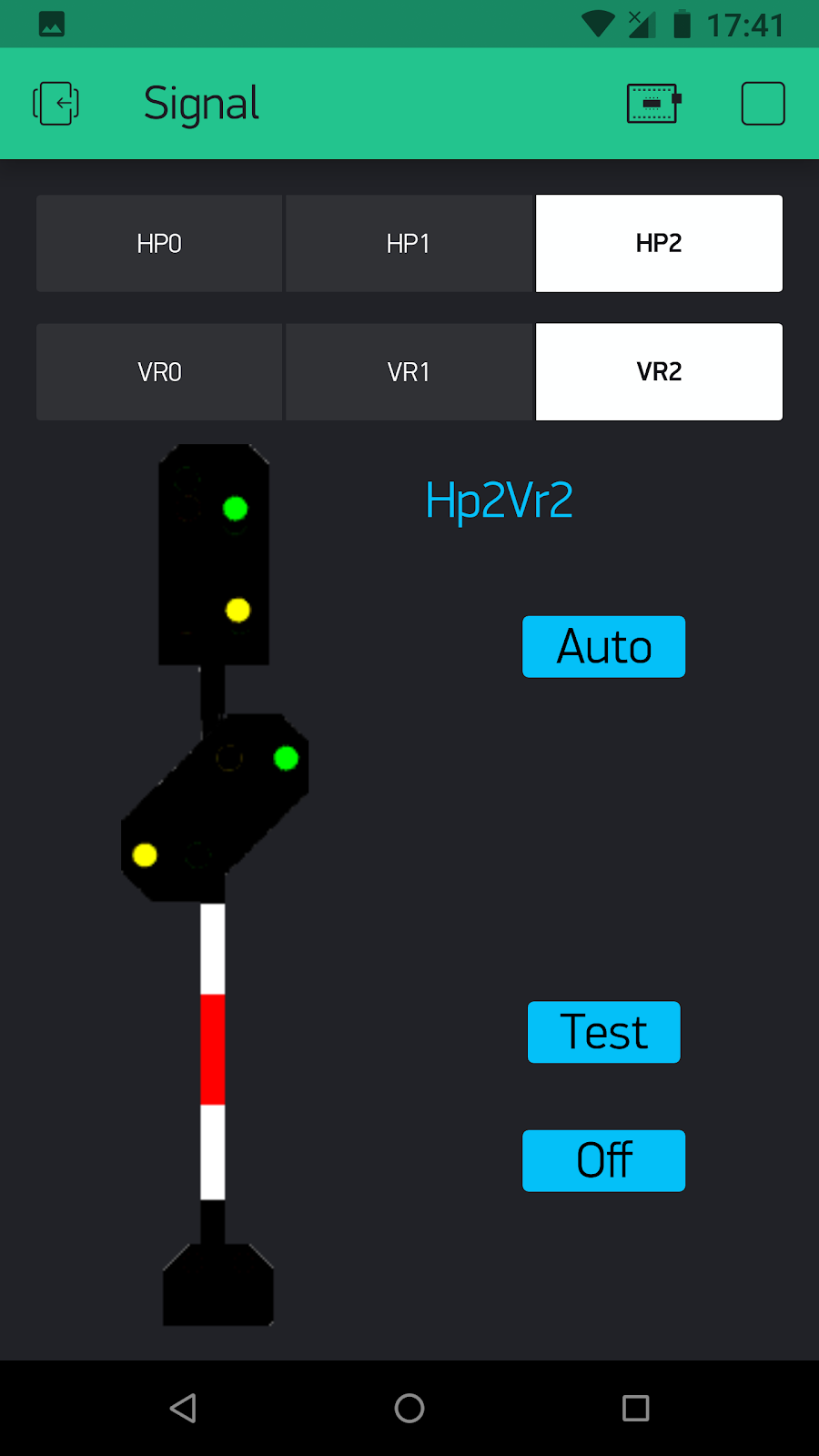
Then I made one that would run on a phone using Blynk technology. It did not allow the flexibility to position the signal in the image so I displayed signals to the side, but at least it was now on my phone.


And now, I have made one that runs on a phone (and Windows) using AppGameKit

This version has a better speed display, in addition to the track speed limit and current desired speed of the train, speeds above the speed limit of the (lead) locomotive are shown in red. The speedometer scale also changes dynamically according to the maximum speed of the current locomotive.

As before, all available digital functions can be invoked by buttons, but now the buttons also make a realistic click sound. It also superimposes signals onto the track image. When one touches any control in the cab, the image outside the window goes out of focus for half a second to simulate the depth of field of the driver's vision.

It now also features a cab window frame with windscreen wiper.

The Locomotive name and current odometer is also displayed. The odometer changes as the train travels about and is an actual distance covered by that model, accumulated over the years.


When the signal changes it shows immediately.


A new feature is the ambient light of the track image can also be simulated from bright and sunny to pitch dark. The locomotive headlights light up the image too! Here it is getting somewhat dark and the loco lights are on.


In total darkness and no headlamps!  The ambient light data comes from the layout control software which will relay the current ambient light of the layout room. So, as a sunset occurs, we see sunset colors in the cab control on the phone!

(I plan on perhaps not having the reflective stripes show up without the headlamps.)


When inside an underground station that has its own lighting, the image is of course not darkened.

Oh, and it can also announce destinations etc. in German. When the train being viewed is dispatched there is a voice announcement stating that the driver has permission to start and what the destination is. If a trip is cancelled, that is also announced. 

When the train has been dispatched, the desired speed is indicated with a yellow marker on the speedometer, and also presented (below the digital speed indicator) in yellow. 84Km/h in this example:

As before, it can also:

  • Turn layout track power on and off
  • Disable unexpected train alerts
  • Pick any train and dispatch it to any destination.


  • Trigger any event in the train control software
  • Set any accessory address to red/green
  • Monitor any sensor address

The track images are cached on the phone. If the software is directed to use an image it does not have, it fetches the image from the Bw software. It can also request all the images for all tracks and caches those for instant loading as needed.

It is based on the RemoteSign command set, communicating with my Bw train software over the network.

I might add the Buchfahrplan information display so the person driving the train sees the prototypical journey information as they progress along their trip.

Update

I have added a throttle so one can control the acceleration and braking of the train.

I have also added Indusi, Sifa and AFB features.

The Indusi system warns the locomotive driver about upcoming signals and they have to acknowledge these warning by pressing an acknowledgement within 30 seconds, and bring the train speed below a certain threshold within 20 seconds. If these conditions are not met the emergency brakes are applied. The allowable speed for the train after passing 1000Hz Indusi transponder is also indicated with the prototypical flashing. The system automatically sets the Indusi category (which in turn governs the speed limits allowed) based on the train definition in the main layout control software.

Here an ICE has passed a 1000Hz Indusi magnet and has 20 seconds to get below 85km/h (and is only doing 70)


Sifa is an additional driver attentiveness system that requires a button to be pressed periodically. If the button is not pressed, then a verbal warning is made in the cab and if the Sifa button is still not actuated, the emergency brakes are applied.

The AFB (Automatische Fahr- und Bremssteuerung) mode can be switched on and off. When it is on, the system controls the speed of the train itself. When it is off, you have to set the throttle/brake control manually to regulate the speed of the train.

Here an ICE is coasting along at 107km/h with AFB off.


A train with the lowest speed category in a hidden area awaiting a green signal


An S-Bahn train in the middle category:


2019-03-26

Outdoor signal with wi-fi control

A few years back I created a replica of a German signal which stands outside our house. It was manually controlled by four switches in the base. Some folks were surprised that I had not made it fully automated and controllable from my phone, so to appease the underwhelmed, I have now done so!

I replaced the four toggle switches with an ESP8266 processor which drives an array of relays that switch each light on or off as needed.

An app on my phone allows me to pick any aspects for the main signal and the distance signal.